
EDR vs XDR: How to Choose the Right Detection Approach
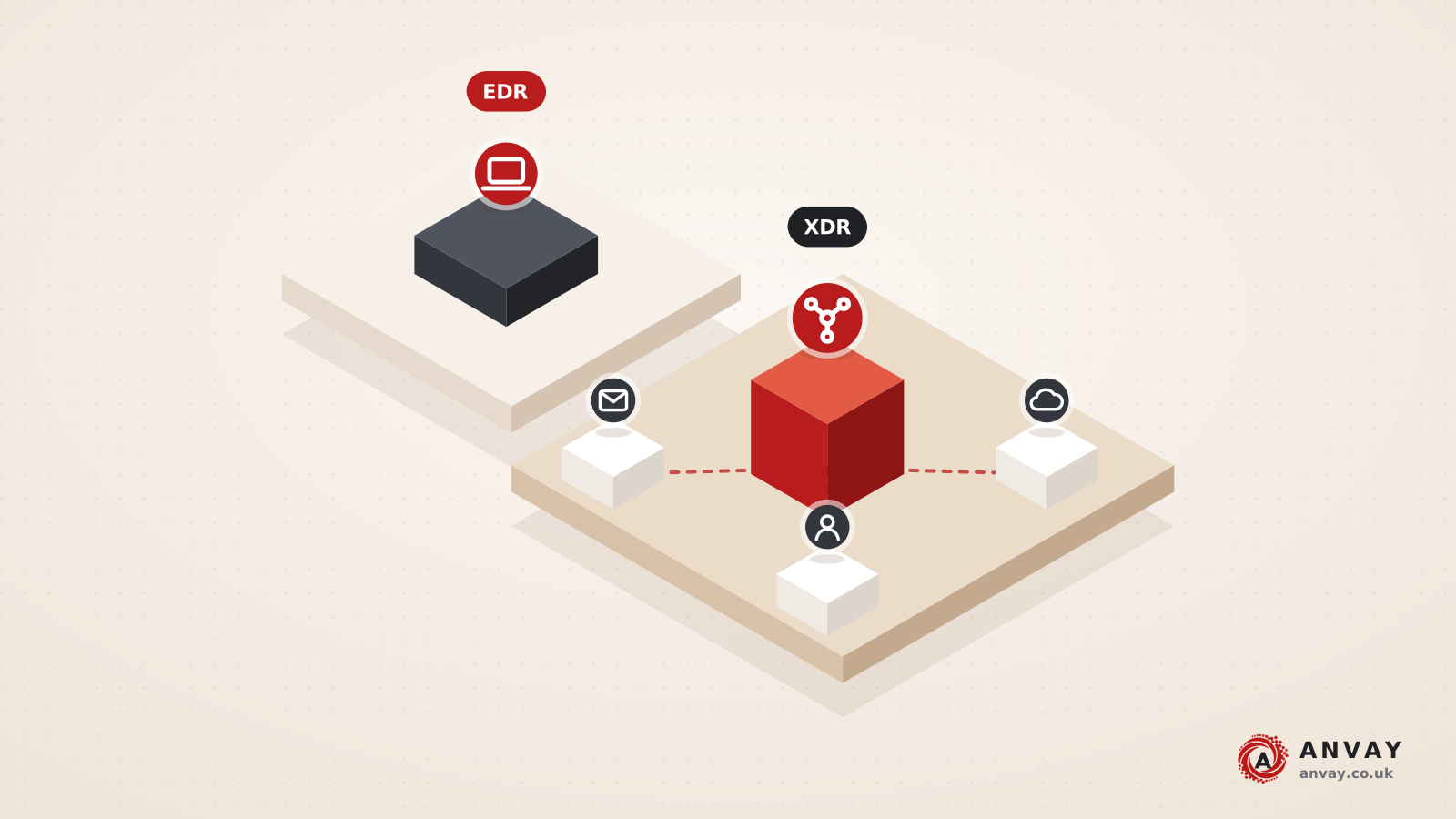
EDR vs XDR comes down to scope: endpoint detection and response (EDR) watches and acts on laptops and servers, while extended detection and response (XDR) correlates signals across endpoints, identity, email, cloud and network. Neither works without people to triage alerts. Before buying either, map your coverage gaps and team capacity, then test shortlisted tools against your own environment.
TL;DR
- Start with an inventory: confirm which devices, identities, mailboxes and cloud services you actually need to see before comparing tools.
- Choose EDR when endpoints are your main gap; consider XDR when attacks you worry about cross identity, email and cloud as well.
- Decide early who watches alerts out of hours. If nobody can, budget for a managed detection and response (MDR) service.
- Run a proof of value on your own estate for typically 2 to 4 weeks, with agreed success criteria mapped to MITRE ATT&CK techniques.
- Within about 90 days of go-live, tune detections and test response with a tabletop exercise.
What is EDR, and why does it matter?
Endpoint detection and response (EDR) is software that runs an agent on each laptop, desktop and server. It records detailed activity – processes started, files changed, network connections, user logons – and sends that telemetry to a central console. Detection rules and behavioural analytics look for patterns associated with attacks, such as credential dumping, suspicious scripting or ransomware-style file encryption.
The “response” part is what separates EDR from traditional antivirus. An analyst, or an automated playbook, can:
- isolate a host from the network while keeping the management connection open;
- kill a malicious process or quarantine a file;
- pull forensic data from the device for investigation;
- search across every endpoint for the same indicator.
That matters because many modern intrusions use legitimate tools and stolen credentials rather than obvious malware. Signature-based protection may not flag them. Rich endpoint telemetry gives you a chance to spot the behaviour, and the response actions let you contain it quickly.
What is XDR, and how is it different?
Extended detection and response (XDR) takes the same idea and widens the lens. It collects telemetry from several security layers – typically endpoint, identity, email, cloud workloads and SaaS, and sometimes network – and correlates it into a single incident. Instead of three separate alerts for a phishing email, a risky sign-in and an unusual process on a laptop, XDR aims to show one story with one timeline.
The practical benefits are faster investigation and coordinated response: disabling a compromised account, purging a malicious email from every mailbox and isolating the affected host from one place. The trade-off is that XDR is only as good as the data sources connected to it, and it generates more to review if it is not tuned.
Native vs open XDR
You will see two broad approaches:
- Native (or closed) XDR draws mainly on one supplier’s own products across endpoint, email, identity and cloud. Integration tends to be tighter and deployment simpler, but you are more tied to that supplier’s portfolio.
- Open (or hybrid) XDR ingests telemetry from third-party tools you already own through connectors and APIs. It suits mixed estates, but connector quality varies and you will need to check how deeply each source is understood, not just whether it is ingested.
EDR vs XDR: a side-by-side comparison
The table below compares EDR, XDR, SIEM and MDR on the questions buyers usually ask. Treat it as a starting point; individual products blur these lines.
| Aspect | EDR | XDR | SIEM (with SOAR) | MDR |
|---|---|---|---|---|
| Scope | Endpoints and servers | Endpoint plus identity, email, cloud, sometimes network | Any log source you connect | Whatever tools the provider operates for you |
| Telemetry | Deep, device-level activity | Curated, cross-layer security data | Broad logs, often less security context per source | Depends on the underlying EDR, XDR or SIEM |
| Detection | Endpoint behaviour and rules | Correlated incidents across layers | Rules and analytics you build and maintain | Provider’s analysts and detection content |
| Response | Isolate host, kill process, quarantine | Coordinated actions across endpoint, identity and email | Automated playbooks via SOAR | Provider acts within agreed authority |
| Who runs it | Your team or a provider | Your team or a provider | Usually a dedicated security operations team | The provider, with your escalation contacts |
| Typical fit | Endpoint-heavy estates, first step beyond antivirus | Cloud and SaaS-first organisations with identity and email risk | Compliance-driven log retention, complex or regulated estates | Teams without 24/7 monitoring capacity |
MDR vs EDR vs XDR: product or service?
The “MDR vs EDR vs XDR” question often confuses buyers because it compares different things. EDR and XDR are technology. Managed detection and response (MDR) is a service model: a provider monitors your alerts, investigates them and takes, or recommends, response actions, usually around the clock. Most MDR services run on top of an EDR or XDR platform, either their own choice or one you already licence.
For many UK SMEs and mid-market firms, the real decision is not EDR or XDR, but who will watch the console at 2am on a Sunday. If the honest answer is “nobody”, the tool choice matters less than the service wrapped around it. When assessing MDR, look at what the provider will do without asking (for example, isolating a laptop), what needs your approval, and how quickly they escalate.
SIEM vs XDR: do you need both?
A security information and event management (SIEM) platform collects and stores logs from almost anything – firewalls, applications, line-of-business systems – and lets you write detections across them. SOAR (security orchestration, automation and response) adds automated playbooks. XDR is narrower but more opinionated: it ships with correlation and response built in for the sources it understands.
In the SIEM vs XDR debate, the answer for smaller organisations is often XDR first, with a SIEM added when you need long-term log retention, custom detections for bespoke systems, or evidence for regulators and auditors. Larger or regulated organisations commonly run both, with XDR feeding high-quality incidents into the SIEM. The NCSC’s logging and monitoring guidance is a useful reference for deciding which logs to keep and why.
Where Cyber Essentials fits
Cyber Essentials includes malware protection as one of its five technical controls. That is an important baseline, and certification is carried out by independent certification bodies. But meeting the malware protection requirement is not the same as having EDR. Cyber Essentials sets a minimum standard for preventing common attacks; it does not require detailed telemetry, investigation tooling or a response capability. If you are working towards it, our guide on how to prepare for Cyber Essentials covers the basics, and EDR or XDR then builds detection and response on top.
EDR vs XDR decision checklist
Work through these steps before you speak to suppliers. Each one should produce a short written answer you can hand to a shortlist.
- Find your coverage gaps. List every device type and operating system, including servers, Macs, Linux workloads and unmanaged or contractor devices. Note where an agent cannot be deployed.
- Map your identity, email and cloud estate. Which identity provider, email platform, SaaS applications and cloud accounts hold your critical data? If most risk sits there, XDR or additional connectors become more relevant.
- Be honest about team capacity. Who triages alerts in working hours, and who covers nights, weekends and holidays? If there is no answer for 24/7 monitoring, build MDR into the requirements.
- Set log retention needs. Agree how long telemetry must be kept for investigations, contracts or regulation. Retention periods vary by product and licence tier, so ask explicitly.
- Check integration. Confirm connectors for your existing firewall, identity, email and ticketing tools, and whether response actions work through them or only data ingestion.
- Understand the licensing model. Ask whether pricing is per endpoint, per user, per data volume or bundled, and what happens as you grow. Compare on like-for-like scope, not headline features.
- Map detections to MITRE ATT&CK. Pick the techniques most relevant to your threat profile from MITRE ATT&CK and ask each supplier to show how they detect them, ideally during a proof of value.
- Plan response testing. Agree who can isolate a host or disable an account, and schedule a tabletop exercise to rehearse it within the first few months.
Timeline and effort drivers
A typical selection runs in phases: requirements and shortlisting over roughly 2 to 4 weeks, a proof of value of 2 to 4 weeks, then deployment. Agent rollout across a modest estate can take a few weeks; larger or more varied estates take longer, especially where servers need change windows or legacy systems need exceptions.
The main effort drivers are:
- the number and variety of endpoints, operating systems and locations;
- how many data sources XDR or SIEM must ingest and normalise;
- how much tuning is needed to reduce false positives to a manageable level;
- whether you operate the platform yourself or hand monitoring to an MDR provider;
- how mature your incident response plan and escalation paths already are.
Expect the first 60 to 90 days after go-live to involve regular tuning. Plan for it rather than treating deployment as the finish line.
Common mistakes when buying EDR or XDR
- Buying XDR without people to triage alerts. A powerful console that nobody reviews is a cost, not a control. Decide on staffing or MDR before signing.
- Poor deployment coverage. Agents missing from servers, new starters’ laptops or cloud workloads leave blind spots exactly where attackers land. Track coverage as a monthly metric.
- Untested response. Isolation and account-disable actions that have never been rehearsed tend to stall when someone worries about disrupting the business. Agree authority in advance and test it.
- Leaving default policies in place. Running in detect-only mode indefinitely, or never tuning noisy rules, undermines both protection and trust in alerts.
- Choosing on demos alone. A polished demo on a clean lab is not your estate. Insist on a proof of value with your own devices and identities.
How Anvay approaches EDR vs XDR decisions
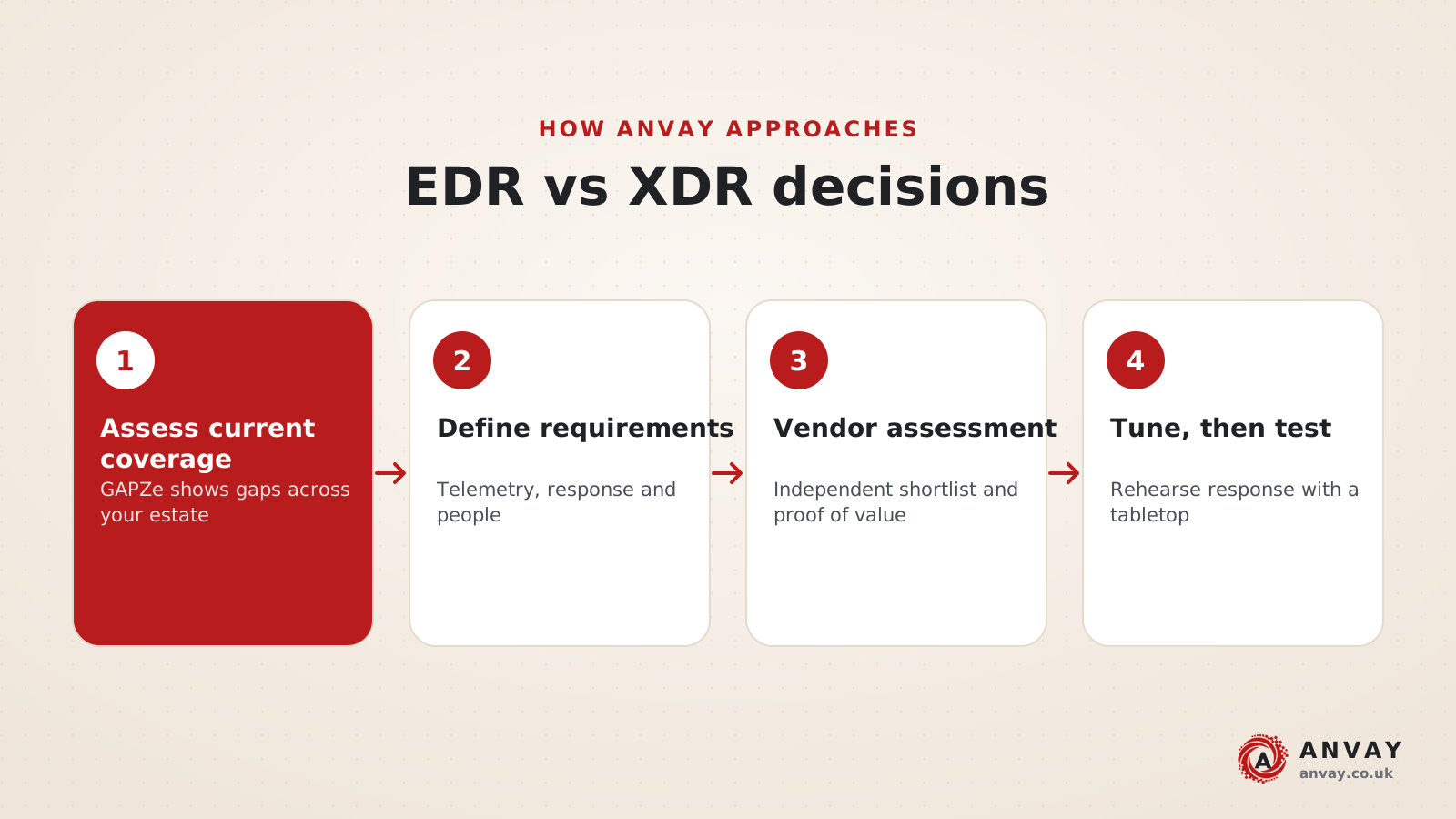
We stay vendor-neutral. Our role is to help you define what good looks like for your organisation, then test the market against it. The work follows four steps:
- Assess current coverage with GAPZe. A free GAPZe assessment gives an indicative readiness screening based on your self-reported answers, highlighting where detection and response gaps are likely to sit. It is not a certification or audit opinion.
- Define requirements and telemetry. We agree which endpoints, identities, email and cloud sources must be covered, retention needs, team capacity and response authority, aligned to the Detect and Respond functions of the NIST Cybersecurity Framework 2.0.
- Vendor assessment and proof of value. Through our vendor assessment service, we build the shortlist, run structured evaluations and score a proof of value against criteria mapped to MITRE ATT&CK.
- Tune, then test with a tabletop. After deployment we help reduce noise, then run a tabletop exercise to rehearse escalation and response, drawing on NIST SP 800-61 Rev. 3 incident response recommendations.
If you are also weighing up which framework to anchor your security programme on, see our comparison of NIST CSF vs ISO 27001.
One practical takeaway on EDR vs XDR
Before you compare a single product, write one page that answers three questions: what must we see, who will respond, and how fast. That page turns the EDR vs XDR decision from a feature contest into a fit test. Tools that cannot meet it on your own estate during a proof of value are not the right choice, however strong the demo.
— Achal, Anvay
Anvay services for detection and response
We support organisations at each stage of choosing and operating endpoint and extended detection and response. Our cyber assessments establish your current coverage and priorities. Our vendor assessment service runs a structured, vendor-neutral selection and proof of value. Tabletop exercises test that response works in practice, and security advisory helps you shape the operating model, including when to use MDR. A good first step is the free GAPZe assessment, which includes a PDF report and a 30-minute 1:1. Book your free GAPZe consultation to discuss where EDR, XDR or MDR fits for you.
FAQ
What is the difference between EDR and XDR?
EDR monitors and responds to threats on endpoints such as laptops and servers, using an agent that records detailed device activity. XDR extends detection across several layers, typically identity, email, cloud and network as well as endpoints, and correlates the signals into single incidents. XDR offers broader context, but it depends on connected data sources and people to act on alerts.
Is XDR better than EDR for a small business?
Not automatically. If most of your risk sits on endpoints and you have limited capacity to review alerts, a well-deployed EDR with a managed monitoring service may serve you better. XDR becomes more valuable when identity, email and cloud services hold critical data and attacks are likely to cross them. Decide based on coverage gaps and team capacity, not feature lists.
MDR vs EDR vs XDR: which do I need?
EDR and XDR are technologies; MDR is a service in which a provider monitors and responds to alerts for you, usually around the clock. Many organisations need a technology plus a service. If you cannot staff 24/7 monitoring internally, consider MDR running on an EDR or XDR platform, and agree clearly what actions the provider may take without asking.
Does Cyber Essentials malware protection count as EDR?
No. Cyber Essentials malware protection is a baseline control to prevent common malware, and it is an important starting point. EDR goes further by recording detailed activity, supporting investigation and enabling response actions such as isolating a device. Many organisations hold Cyber Essentials and add EDR or XDR to strengthen detection and response.
Do I still need a SIEM if I buy XDR?
Possibly. XDR handles correlated detection and response for the sources it supports. A SIEM is usually added when you need long-term log retention, custom detections for bespoke or legacy systems, or evidence for auditors and regulators. Smaller organisations often start with XDR and add a SIEM later; larger or regulated ones commonly run both.
Sources
- Cybersecurity Framework 2.0 resource centre (NIST)
- SP 800-61 Rev. 3: Incident Response Recommendations and Considerations for Cybersecurity Risk Management (NIST)
- MITRE ATT&CK knowledge base (MITRE)
- Cyber Essentials overview (NCSC)
- 10 Steps to Cyber Security: Logging and monitoring (NCSC)
- Incident management guidance (NCSC)
Primary references and standards: this article draws on NIST CSF 2.0 and SP 800-61 Rev. 3, MITRE ATT&CK and NCSC guidance on Cyber Essentials, logging and incident management.